
Buyer journey: from discovery to delivery
Last updated 7 November 2026
On Martiqo you buy from independent sellers of products, food, services and software. You place an order first — your card is not charged — the seller confirms price, shipping and delivery, you accept, and then you pay by card through Stripe. The seller delivers and is responsible for the sale.
In 20 seconds: browse → sign in → choose options and Buy now (or cart → Checkout) → confirm your delivery address → the seller confirms the terms → you accept → you see the exact total and pay → the seller ships → you confirm receipt.
The whole journey
1. Find and compare
Search Martiqo or browse a shop. No account is needed to look. Prices are listed before VAT; you can switch the display currency in the header — the amount actually charged is shown on the order before you pay. Open a shop to read its description and contact page, and open a product to see its pictures, options and, when the seller has one, a link to the full product page on the seller's own website.
| If you buy… | Check before ordering |
|---|---|
| A product | The right variant (size, colour), quantity, where it ships from and whether the seller delivers to your country. |
| Food | Where and when the seller delivers or hands over, and any ingredient details that matter to you. |
| A service | What exactly is included, where it is performed, and when. |
| Software | Licence scope, how you receive or activate it, and support. |
If something is unclear, the shop's contact page lets you reach the seller before you order — and once you have placed an order, the order page has a message thread with the seller.
Cannot find what you need? With an account you can post a buyer request describing it; sellers who can supply it respond.
2. Sign in and choose which shop you buy as
Ordering needs a Martiqo account (email or Google sign-in) with at least one shop. Every account buys and sells through shops: a buyer-only shop has no subscription fee and simply holds your invoice identity — your name or company, address and, for businesses, VAT number — which the seller needs for the invoice and the delivery.
This is the one thing on Martiqo that works differently from other marketplaces: one account can own several shops — some that only buy, some that also sell — and every shop keeps its own orders, statistics and reputation. A buyer-only shop can switch selling on later and keeps buying. Full explanation: Accounts and shops.
- Create the invoice identity under Manage invoice identities, then add a shop under Manage shops.
- If you have several shops (for example a personal one and a company one), you choose which one you Buy as for each item.
- Business buyers in the EU: enter your VAT number in the invoice identity. Once it is confirmed in VIES, VAT-registered sellers charge you no VAT where reverse charge applies.
3. Place the order — no payment now
On a product you choose the options and quantity, then either:
- Buy now — places an order for this product right away, or
- Add to cart and later Checkout — one checkout per seller (see below).
The Place order panel shows the items and asks for the delivery address (your invoice address or another one) and a phone number for the courier; you can add a note for the seller. For products that ship from a dropshipping supplier you may also pick the shipping option there. Then you confirm — and the panel says it plainly: No payment now — the seller will review your order first.
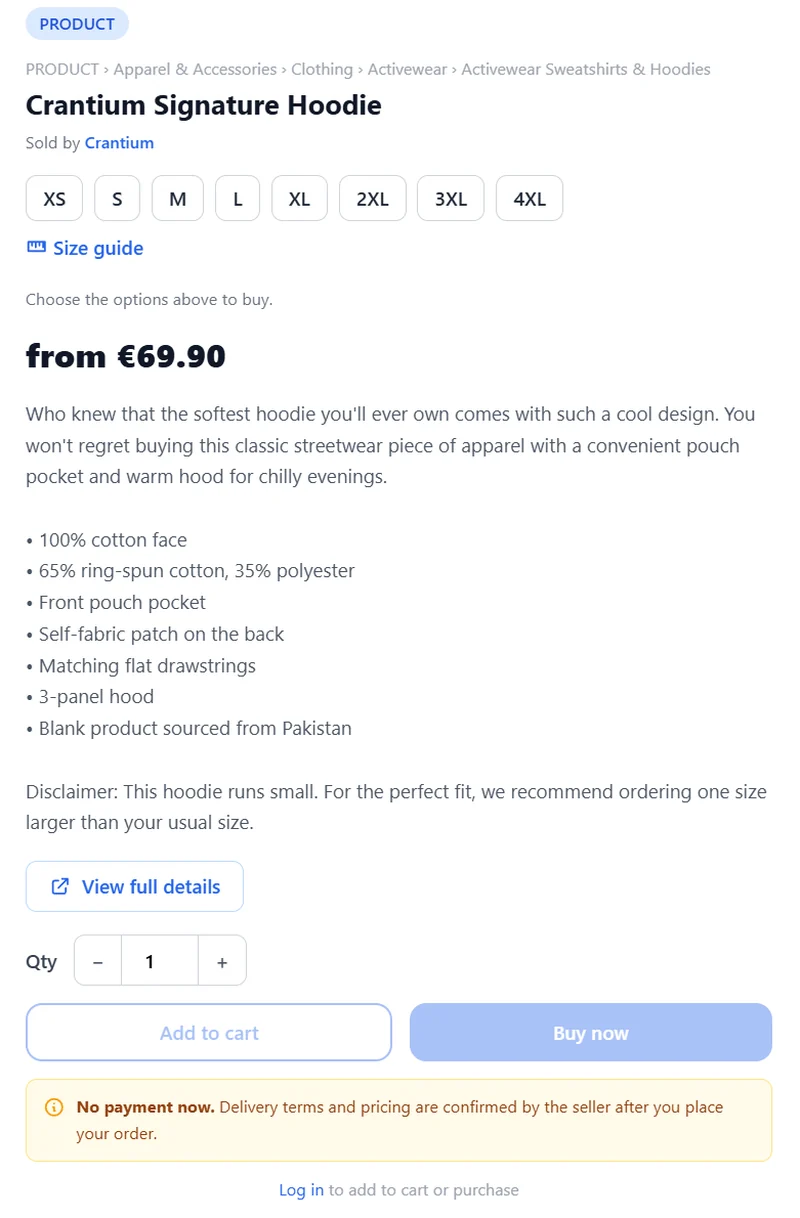
The seller is notified and has 7 days to respond. If prices changed between opening the panel and confirming, Martiqo shows you the current prices and asks you to place the order again, so you never order at a price you have not seen.
The most important thing to know: ordering is not paying
Placing an order records what you want to buy. The seller confirms what will be delivered, when, for how much and how it is paid; you accept; only then do you pay. If the terms do not suit you, propose a change or cancel — nothing has been charged and nothing will be charged automatically.
Worked example. You find a jacket at €80 and place the order. The seller confirms it is in stock, adds €8 shipping to your address and commits to deliver within 5 days of payment. You accept. The order page shows €88 — plus VAT if the seller is VAT-registered and VAT applies to you — and you pay that amount by card. The seller ships and registers the tracking. The figures are illustrative.
4. The seller confirms the terms; you accept or counter-propose
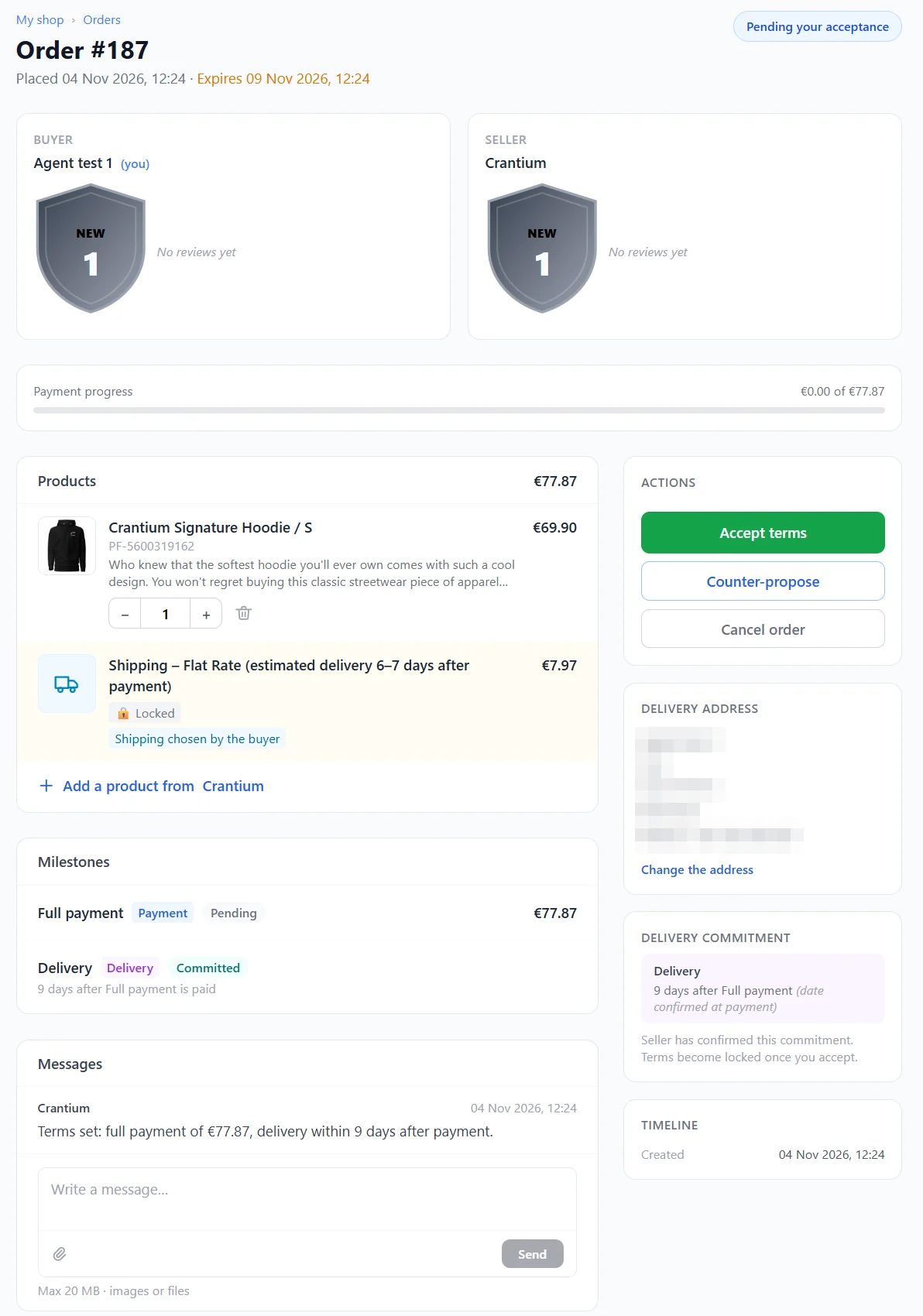
The order moves to Pending your acceptance when the seller has set the terms. On the order page you see:
- the final price of each item and any lines the seller added (shipping, packaging, …);
- the payment schedule — usually one full payment; for larger orders possibly an advance and a final payment;
- the seller's delivery commitment — a date, or a number of days after your payment. The page marks it as the seller's commitment, not guaranteed by Martiqo.
You can accept, counter-propose (a different price, quantity or payment schedule, unless the seller has locked it — the seller then accepts or adjusts again) or cancel. You have 7 days to respond, the seller the same; an order nobody answers expires. Before the first payment either side can cancel free of charge.
5. See the exact total and pay
Once the terms are agreed, the order is Awaiting first payment. The order page shows the exact amount, including VAT when the seller is VAT-registered and VAT applies to your address and status. You pay by card on a Stripe Checkout page that belongs to the seller's Stripe account, within 3 days. After payment the order is In progress.
- The money goes to the seller's Stripe account. Martiqo deducts its flat fee from the seller's side; you pay no Martiqo fee.
- You pay in the seller's currency; the amount to be charged is shown on the order before you pay.
- Martiqo does not hold the money in escrow. The seller's delivery commitment, the dispute process and your legal rights are what protect you after payment.
- For orders with several payments, the seller requests each next payment from the order page when it is due; each is a separate card payment.
6. Buying from several sellers at once
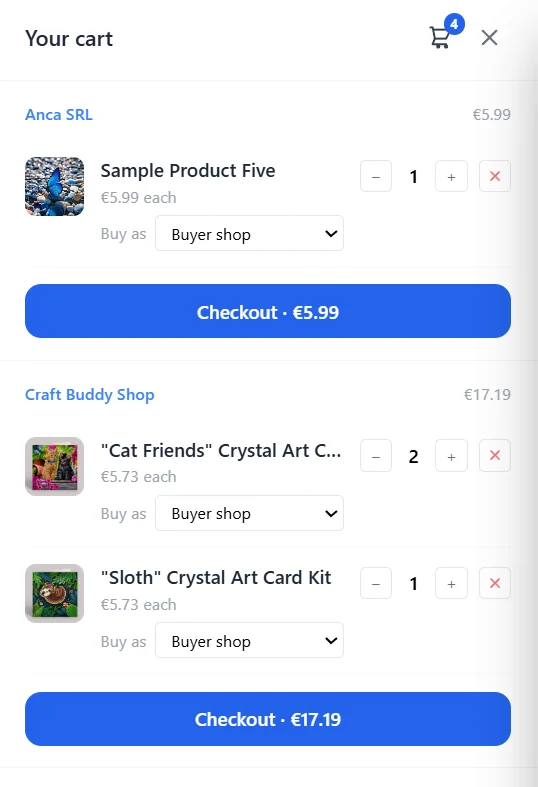
Your cart groups items by seller and each group has its own Checkout button. Each seller becomes a separate order with its own terms, payments, shipping and invoice. There is no single payment for several sellers, because every payment goes to that seller's own Stripe account.
7. Delivery and confirming receipt
The seller ships or performs the service and registers the shipment on the order, with tracking when available — the order shows Shipped. When you have received everything, confirm receipt on the order page: the order is Completed. If you do nothing, the order completes by itself after the delivery window (2× the delivery time the seller committed to). Use the order's message thread for anything in between.
8. Your invoice
The seller is responsible for your invoice. Depending on the seller's choice you receive it either from the seller's own invoicing software or, automatically after each payment, as a PDF emailed by Stripe in the seller's name and linked from the order. Keep it together with your payment confirmation. Details: Invoices issued by Stripe · Issuing invoices yourself.
9. If something goes wrong
- Before paying — cancel from the order page; nothing has moved.
- After paying — if you cancel, the advance already paid stays with the seller. If the seller cancels, the seller returns your money (for example a Stripe refund); the order asks you to confirm when it has arrived.
- Dispute — while the order is in progress or shipped you can open a dispute on the order page with a note explaining the problem. It opens a 7 days message thread with the seller; afterwards each side records whether it was resolved. Martiqo does not hold funds and does not decide disputes; the outcome is recorded on both sides' order history.
- Your legal rights — withdrawal, returns and warranty depend on the seller's type (individual or business) and your country, and are owed to you by the seller named on the order.
Buying safely: a short checklist
| When | Ask yourself | Do |
|---|---|---|
| Before ordering | Is the seller clearly identified? Does the listing say what I need to know? | Read the shop page and contact the seller if something is missing. |
| Before accepting | Are the price, shipping and delivery date clear and acceptable? | Counter-propose or ask in the order messages; accept only what suits you. |
| Before paying | Does the total on the order page match what I agreed? | Pay only then — nothing forces you to. |
| After paying | Do I have the payment confirmation and the invoice? | Keep them with the order. |
| If there is a problem | Have I told the seller? Is the order still open? | Use the messages first; open a dispute while the order is in progress or shipped. |
Frequently asked questions
Am I charged when I click "Buy now"? No. It places the order; you pay only after the seller has confirmed the terms and you have accepted them.
Who sets the shipping cost and delivery date? The seller, when confirming the terms. You see them before you accept.
What if I do not agree with the terms? Counter-propose or cancel. Nothing is charged until you accept and pay.
Who receives my payment? The seller, in their own Stripe account. Martiqo only takes its flat fee from the seller's side.
Can I order from several sellers? Yes — one order and one payment per seller.
Who handles a return or a delivery problem? The seller named on the order. Martiqo gives you the order record, the message thread and the dispute process.
Why do I need a "shop" to buy? On Martiqo every account acts through shops; a buyer-only shop is just the holder of your invoice identity and address, with no subscription fee.
Next steps
- Browse Martiqo and open a few shops.
- Read How Martiqo works for the full picture of roles, money and fees.
- Thinking of selling too? Read the seller journey.